Looking for what Form 2307 is, or a filled-in sample? See BIR Form 2307: sample and how to fill it out.
You can print BIR Form 2307 straight from Oojeema. The form is built from the purchases and expenses where you recorded withholding tax, so you don’t retype names, TINs, or amounts.
After recording a purchase or expense with tax withheld:
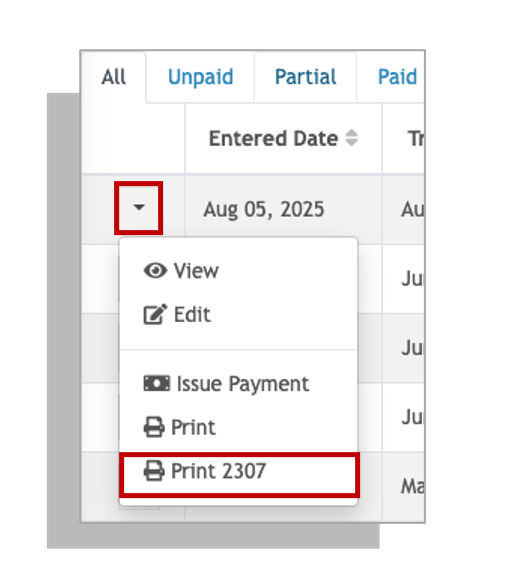
- Click the drop-down icon below the transaction where you withheld tax.
- Select Print 2307.
- Review the entries in the form: period, supplier TIN and name, ATC, and amounts.
- Click Generate at the bottom of the form to create the PDF.
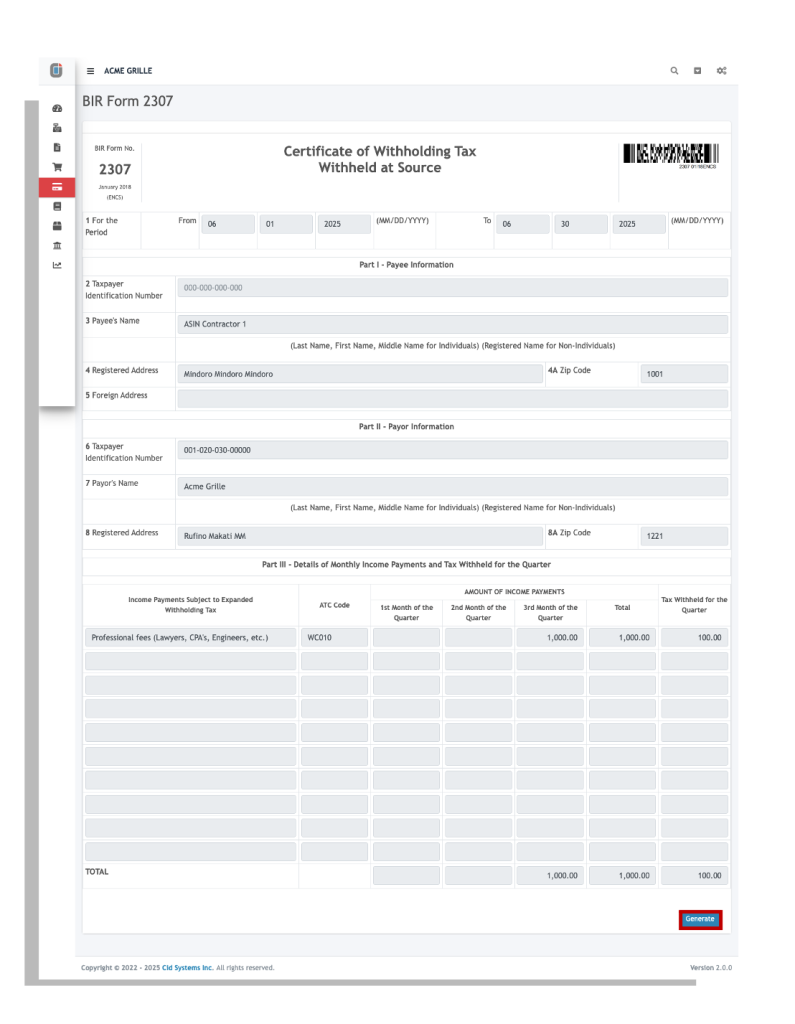
A quick check before you hand it over: the supplier’s TIN includes the branch code, and the amount matches what you actually held back.
Because the 2307 comes from recorded purchases and expenses, keeping those up to date keeps your 2307s and QAP in step. See how recording, invoicing and BIR forms connect on the features page.
Related: BIR forms and DAT in Oojeema · Oojeema pricing


