
SAWT stands for Summary Alphalist of Withholding Taxes. It’s a list of the withholding taxes others held back from your income, organized by who withheld them, and it backs up the tax credits you claim on your return. Below is what it means in plain terms, a sample with made-up data, and how it connects to Form 2307.
Why SAWT exists #
Remember the 2307? When a customer or tenant holds back part of a payment to you, they give you a 2307 as proof. At filing time, you subtract those amounts from the tax you owe. The BIR then wants to see the list behind that number: who withheld, how much, and for what. That list is the SAWT.
The BIR describes it, in RR No. 2-2006, as the “Summary Alphalist of Withholding Agents of Income Payments Subjected to Tax Withheld at Source”, a mandatory attachment to tax returns that claim credits for tax withheld at source. The 2550Q guidelines (April 2024) also list the SAWT as an attachment “if applicable”.
SAWT vs QAP in one line each #
- SAWT: prepared by the one who received income and had tax withheld. It lists the withholding agents.
- QAP (Quarterly Alphalist of Payees): prepared by the one who paid and withheld. It lists the payees.
Same transactions, seen from two sides. When both sides match, the credit is easy to support.
Sample SAWT (fictitious data) #
Halimbawa Leasing Corp. (made-up company, TIN 999-999-999-00000) received 2307s from three tenants for Q3 2026. The first row ties back to the filled-in 2307 sample.
| # | Withholding agent TIN | Withholding agent name | ATC | Income payment | Tax withheld |
|---|---|---|---|---|---|
| 1 | 888-888-888-00000 | Sample Kainan Restaurant Inc. | WC100 | ₱60,000.00 | ₱3,000.00 |
| 2 | 777-777-777-00000 | Halimbawa Printing Corp. | WC100 | ₱45,000.00 | ₱2,250.00 |
| 3 | 666-666-666-00001 | Sample Trading Inc. (branch) | WC100 | ₱90,000.00 | ₱4,500.00 |
| Total | ₱195,000.00 | ₱9,750.00 |
The ₱9,750 total is the amount the landlord claims as tax already withheld for the quarter. Each row should match a 2307 in the file.
Tip lang: Ipunin ang lahat ng 2307 bawat quarter sa isang folder. Kapag kumpleto ang 2307s, halos tapos na rin ang SAWT mo.
Before you prepare the DAT file #
The SAWT is submitted as a DAT file, a plain-text format the BIR’s tools can read. A few checks first:
- Every 2307 you received for the period is recorded.
- TINs (with branch code) and registered names match the certificates.
- ATCs and amounts match what’s printed on each 2307.
- The total tax withheld equals the credit you’ll claim on the return.
- The period on each certificate belongs to the quarter you’re filing.
Common validation errors #
- TIN format problems, or a name that doesn’t match the 2307
- Totals that don’t add up to the underlying certificates
- The wrong period or year
- A certificate counted in the wrong quarter
These are usually quick to fix: correct the entry and generate the file again.
Generate SAWT in Oojeema #
The Summary Alphalist of Withholding Tax can be generated in Oojeema in both DAT and CSV formats.
- Select Reports from the sidebar (see this guide to the Oojeema menus).
- Under the Tax Reports section, go to Summary Alphalist of WTax.
- Download the CSV version of the report and/or the BIR compliant DAT file by clicking the matching button.
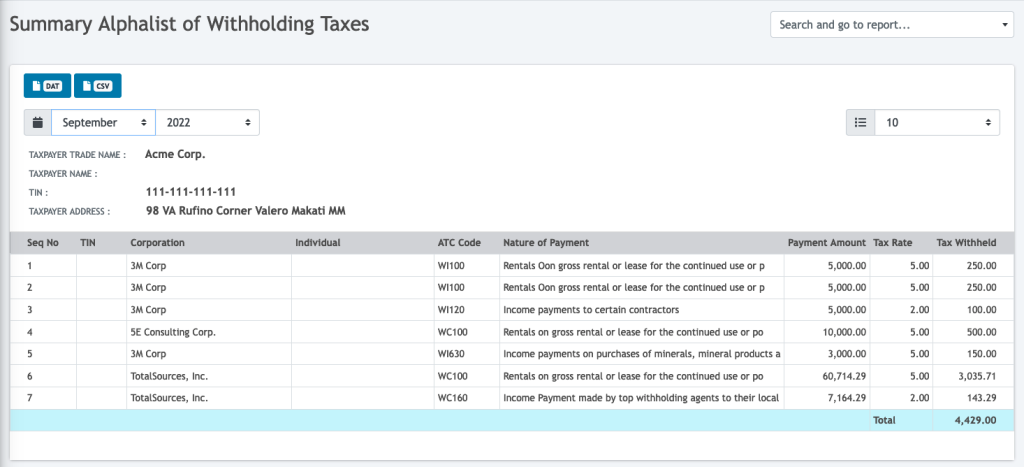
Make sure the TIN of each counterparty is filled in. The CSV and DAT downloads need complete TIN information.
Oojeema prepares the SAWT from transactions already in your books, along with other BIR forms and DAT files such as 2307, QAP and SLS/SLP. You can see the full list on the BIR forms and reports page.
This page explains the SAWT in plain terms. It isn’t tax advice. The taxpayer or their accountant prepares and files the return and its attachments.
Related: BIR Form 2307 sample · BIR Form 2550Q · BIR forms in Oojeema


